
Payme: Class Action Payout
GAMEPEAK LIMITEDFinance
3.036.00 Reviews
- Version
- 1.0.20
- Installs
- 50.00K
- Age Rating
- Teen
Screenshots
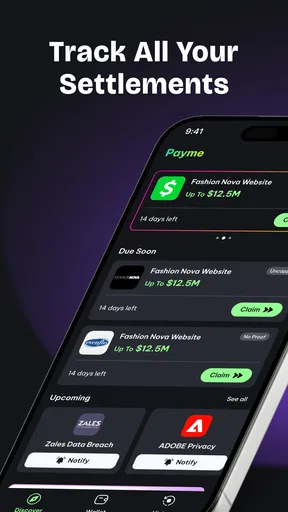


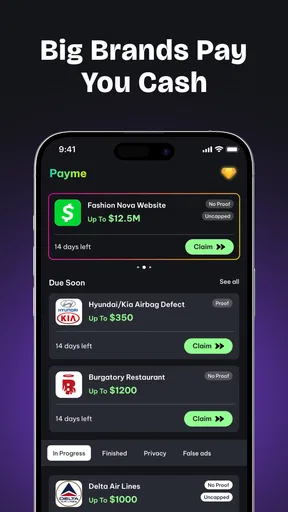
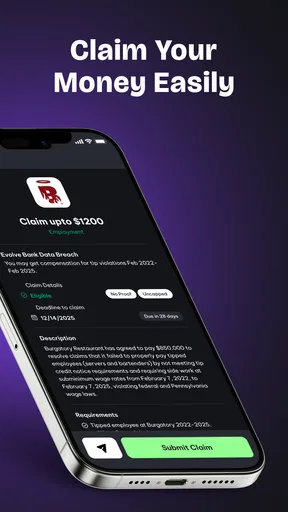
Our Review of Payme: Class Action Payout
 Analysis by Appyee
I approached Payme: Class Action Payout as a practical finance tool rather than something to open casually. Its purpose is straightforward: help people submit eligible class-action claims, keep an eye on their progress, and follow potential settlement payments. That focus makes it different from a banking app or a budgeting tracker. It is aimed at a specific moment in a user’s financial life, when a claim may be worth pursuing but the paperwork and follow-up are easy to forget.
My first impression is that the idea is useful, especially for anyone who has seen settlement notices and wondered whether they were worth the effort. The app is free to install, although individual in-app items are listed from $7.99 to $14.99. That immediately makes it important to understand what you are paying for before committing to anything. I would treat it as a claim-management helper, not as a guaranteed source of money.
How the basic claim workflow feels
The most sensible way to use Payme is to begin with one claim at a time. Read the settlement details carefully, check whether your circumstances match the eligibility requirements, and only then move through the submission process. The app’s central promise is convenience, but convenience should not replace checking the actual terms of a settlement.
I found the tracking idea more valuable than the initial submission itself. Filing a claim can be a short task, while remembering what happened afterward is much harder. A claim may require waiting, checking for updates, or responding to a request for more information. Keeping those details together gives the process a clearer shape than relying on scattered emails, browser tabs, or a note on your phone.
A realistic example would be someone who receives several settlement notices over the course of a year. They may recognize one company, forget another, and delete a message because it looks like ordinary promotional mail. With Payme, the useful habit is to review each opportunity when it appears, record the claim status, and return later instead of assuming that silence means the process is complete.
That workflow also highlights an important limitation: the app cannot make an ineligible claim valid. It can help organize the action a user needs to take, but the settlement’s own eligibility rules remain decisive. I would never enter information simply because a possible payout looks attractive. The right order is eligibility first, details second, submission third, and follow-up afterward.
The app is developed by GAMEPEAK LIMITED and sits in the finance category, though it is much narrower than a typical money-management product. It is not designed to replace a bank account, expense tracker, tax tool, or investment platform. Its value depends on whether you actually have relevant claims to manage. If you have no interest in settlements, its usefulness will be limited even if the interface is easy to understand.
What I would prepare before submitting
Experienced users can make the process smoother by preparing the information they commonly need before opening a claim. I would keep the relevant purchase dates, account details, receipts, order records, or other supporting material nearby, depending on what the settlement asks for. This avoids the frustrating pattern of starting a form, leaving the app, searching through old messages, and losing track of where the submission stopped.
A second useful habit is to separate “possible match” from “ready to submit.” A notice may sound familiar without proving eligibility. I would first save or review the opportunity, then verify the qualifying period, product or service involved, and any required documentation. This two-step approach reduces rushed submissions and makes the tracking list more meaningful.
It is also worth recording the date you submitted a claim and the wording of any confirmation you receive. Even if Payme displays a status, keeping your own short note gives you a backup reference. I would include the settlement name, the date of submission, and whether additional action is expected. That small routine is more reliable than trying to remember everything from a notification seen weeks earlier.
Settings and account details worth checking
Before using the app regularly, I would inspect every available account, notification, and privacy-related option rather than accepting the initial setup without thought. A finance app dealing with claims may handle personal information, so it is sensible to understand what the app asks you to provide and which alerts it can send. I would enable only notifications that help with a real task, such as a status change or a required follow-up.
Notifications can become counterproductive if they are too broad. A phone full of reminders creates the same problem as a crowded inbox: important messages become harder to notice. My preferred arrangement would be to keep alerts for action-oriented updates and review the claim list manually at a regular time. That creates a repeatable routine without turning every settlement-related event into an interruption.
I would also check whether the account details and payout information are entered exactly as intended before submitting anything. A small spelling error or outdated contact detail can create avoidable friction later. This is one of the places where slowing down helps. The app is meant to reduce administrative work, but a rushed setup can simply move the work into a later correction.
Because the app carries a Teen content rating, younger users may be able to encounter it, but I would still recommend adult guidance when a claim involves sensitive personal or financial information. The rating does not turn a settlement decision into a casual activity. Anyone using it should understand what they are submitting, why it is needed, and where a payout would be directed.
Faster patterns that save time without rushing
The fastest reliable pattern is not tapping through forms as quickly as possible. It is reducing the number of times you have to revisit the same claim. I would gather supporting details first, read the eligibility language once with attention, and then complete the application in one focused session. If something is unclear, stopping is safer than guessing and hoping the claim can be corrected later.
Another strong habit is a weekly review. I would choose one consistent day to open Payme, check pending claims, and look for anything that needs action. This is more effective than opening the app randomly because it turns an easy-to-forget task into part of an existing routine. The review can be brief when nothing has changed, but it prevents old submissions from disappearing into the background.
For people handling several claims, consistent naming and notes are especially helpful. Use a simple personal system: identify the settlement, mark whether it is being considered or submitted, and note the last action taken. Even if the app already shows statuses, your own wording can make different claims easier to distinguish when their names are similar.
I would avoid submitting duplicate claims through multiple channels unless the settlement instructions clearly allow it. A user trying to improve their chances may accidentally create confusion instead. The better shortcut is to decide where the claim will be managed, keep the confirmation, and use the app’s tracking process consistently.
The same principle applies to payout expectations. I would not plan a bill around a possible settlement payment. A claim can be submitted correctly and still take time to resolve, and the eventual amount may not match the most optimistic interpretation of a notice. Payme is more useful as an organization tool than as a way to forecast personal income.
Where the app reaches its limits
The average rating is 3.0 from around a hundred ratings, with a few dozen written reviews, so I would approach the experience with measured expectations rather than assuming it will be effortless for everyone. Those figures suggest that the concept has attracted attention but that the overall experience is not universally smooth. I would test the core workflow carefully before relying on it for a large set of claims.
The app has attracted over 50 thousand installs, which gives it a meaningful user base for a focused tool, but it is still not the same as using a long-established financial institution. I would be especially careful about treating the interface as an authority on settlement eligibility. The official settlement terms remain the place to verify requirements, deadlines, and payment conditions.
There is also a financial trade-off to consider. Payme is free to install, but its in-app items range from $7.99 to $14.99 each. That can make sense only when the convenience or assistance is worth the cost for a particular claim. For a simple form that you can complete directly through an official settlement website, paying for extra help may not be the best choice. For a complicated process that you are likely to abandon, the calculation may be different, but I would still review the charge before confirming it.
This is where Payme compares most clearly with the usual alternatives. An official settlement website may be the better option when you want the most direct route and are comfortable reading the instructions yourself. A spreadsheet or notes app can be enough for tracking claim names and dates, especially if you already have a personal filing system. An email folder can also work for people who receive only occasional notices.
Payme becomes more appealing when those separate tools are not working together. Its appeal is having submission and follow-up centered around a finance-focused app instead of managing every claim manually. The trade-off is that a specialized app may feel unnecessary for a person with only one straightforward claim, while a user with many opportunities may appreciate the dedicated workflow.
Who should use it, and who should skip it
I would recommend trying Payme to someone who regularly encounters class-action notices, tends to forget deadlines, or wants a single place to monitor claim progress. It may also suit users who dislike building their own spreadsheet and want a more guided way to organize this narrow type of financial task.
I would skip it if you expect guaranteed payouts, automatic eligibility, or a replacement for professional legal advice. I would also hesitate if you are uncomfortable reviewing in-app charges or entering personal information into a specialized service. In those situations, an official settlement administrator’s website or direct legal guidance may be a better fit.
The current version is 1.0.20, and the app supports devices running Android 7.0 or later. That makes it accessible to many Android users, including people who do not keep a recent phone, but compatibility alone does not answer whether the workflow suits you. I would install it only if I had a real claim-management need, then judge it by how clearly it handles one complete submission and its follow-up.
My verdict after building a repeatable routine
Payme: Class Action Payout has a clear, narrow purpose, and I think that is both its strength and its main constraint. It can make settlement claims easier to organize, particularly when the alternative is forgetting notices or losing confirmation details. The most useful experience comes from pairing the app with disciplined habits: verify eligibility, prepare documents, submit carefully, review statuses on a schedule, and never treat a possible payment as guaranteed money.
I would describe it to a friend as a potentially handy assistant for settlement paperwork, not a magic payout service. The free installation lowers the barrier to testing the workflow, while the paid items mean I would examine the value of each purchase before proceeding. Its Teen rating, finance positioning, and focused design make it approachable, but the subject matter still deserves adult-level care with personal details and financial decisions.
My final judgment is cautiously positive for the right user. If you repeatedly miss claim deadlines or find settlement administration scattered across messages and browser tabs, Payme could give you a cleaner routine. If you have one simple claim and prefer dealing directly with the official source, the usual alternative may be faster and cheaper. The best way to use Payme is as a careful tracking companion, never as a substitute for reading the settlement terms yourself.
Verdict
Strengths of Payme: Class Action Payout
- Simple claim process with clear instructions for eligible users.
- Secure handling of payment and settlement information.
- Useful notifications about claim status and payout updates.
- Supports digital payment delivery for faster access to funds.
- Official settlement details help users understand their eligibility.
Limitations of Payme: Class Action Payout
- Only useful to people included in a specific class action settlement.
- Payout timing depends on court approval and settlement administration.
- Requires personal information and claim details during registration.
- Some claims may need additional documents or identity verification.
- Availability and features can vary by settlement and location.
Similar Picks in This Category
View All
Google Wallet
Google LLC4.3

Airtel: Recharge, Bank & Loans
Airtel4.0

PayPal - Pay, Send, Save
PayPal Mobile4.2

DANA Indonesia Digital Wallet
PT Espay Debit Indonesia Koe4.5

Binance: Buy Bitcoin & Crypto
Binance Inc.4.8

Cash App
Block, Inc.4.7
Frequently Asked Questions
What is Payme: Class Action Payout?
Payme: Class Action Payout is an app designed to help users discover and potentially claim money from eligible class-action settlements. It may provide information about ongoing cases, eligibility requirements, deadlines, and claim instructions. Before relying on any listing, carefully review the official settlement notice and confirm that the case applies to you, since not every user will qualify for every payout.
How does Payme: Class Action Payout work?
After opening the app, users can browse available class-action settlements and review details such as the company involved, the reason for the case, estimated payment information, and the filing deadline. If you appear eligible, the app may guide you toward the claim process. You should read all terms carefully and submit information only through an official, verified claim channel.
Is Payme: Class Action Payout free to use?
The app may be available to download without an upfront charge, but users should check its current store listing for subscriptions, optional purchases, advertising, or other fees. A legitimate class-action claim generally should not require you to pay money simply to receive a settlement. Be cautious if any service requests unnecessary payment, sensitive financial details, or access to accounts before explaining the reason clearly.
Is Payme: Class Action Payout safe and legitimate?
The app can be useful as an informational tool, but users should not assume that every settlement listing or payment estimate guarantees a payout. Verify important details through the official court-approved settlement website, administrator, or notice. Avoid sharing passwords, banking credentials, or identity documents unless the official claim process genuinely requires them, and review the app’s privacy policy before submitting personal information.
How long does it take to receive money from a class-action settlement?
Payment timing depends on the specific settlement, the number of valid claims, court approval, appeals, and the administrator’s processing schedule. Even after submitting a claim through information found in the app, payment may take weeks or several months. Keep confirmation emails and claim numbers, monitor official updates, and remember that an estimated payout can change after all claims are reviewed.
